Everything you need
All the tools and features you need to draft, write and export screenplays for film, TV, YouTube or TikTok.
Automatic Formatting
Porcupine works out what you're writing as you write it and automatically formats everything for you.
No need to memorise shortcuts or manually style the page, just focus on telling your story.
Simple by Design
Porcupine is clean, easy-to-use and distraction-free straight out-of-the-box.
Sidebar getting in your way? Hide it for a truly minimalist writing experience.
Use It Anywhere
Porcupine runs on everything (Windows, Mac, Chromebooks, mobile, etc.), on any modern browser, or offline as a web app.
No accounts, registration or downloads needed, just open it up and start writing, no matter where you are.
Easy Export
Instantly export your screenplays as Fountain files, compatible with virtually all other screenwriting apps, or industry-standard PDFs, ready to share or print.
You can also easily import existing Fountain files into Porcupine.
Built-in Essentials
Everything you need to get your ideas from draft to final screenplay.
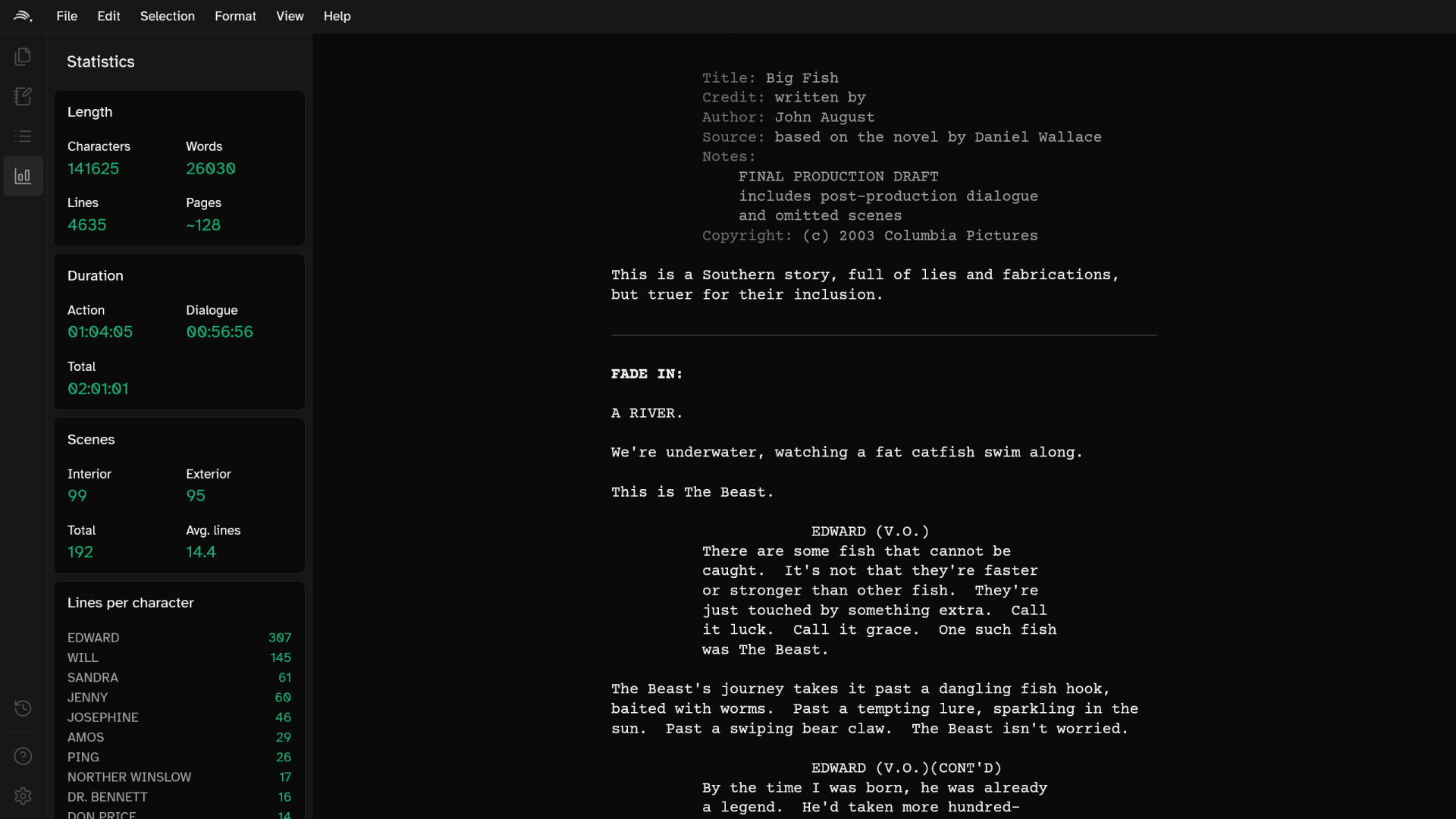
Jot down ideas using the built-in notepad, reorganise your story with the scene overview panel and track word count, lines per character, average scene duration, etc. using the integrated stats view.
Your Files Are Yours
Porcupine doesn't collect, upload or read anything. Everything stays on your computer, inside your browser.
Your files are stored as Fountain files, a readable, plain-text format which is portable and future proof. You're always free to export your files, and never stuck using Porcupine if it's not for you.
And there's more...
Focus on getting ideas down quickly and easily with essential quality of life features inspired by your favourite text editors and screenwriting apps.
- Autosave with revision history
- Customisable fonts, themes and accent colors (including dark mode)
- Autocomplete for character names and scenes
- Drag and drop rearrangable scenes and sections
- Quickly switch between, manage, rename and pin your scripts
- Support for automatic and manual scene numbering
- Familiar keyboard shortcuts
- Plus many more little features designed to make your writing experience as smooth as possible
Pocupine has taken a lot of time and effort to create, so I'd really appreciate your support in keeping it free for everyone. If you've found it useful and would like to support future development, please consider leaving a donation.
You can do so on Patreon or Buy Me a Coffee.
As a thank you, after making any donation you'll be able to hide the "Support Porcupine" button in the corner of the screen.
If you're unable to make a donation, sharing Porcupine also makes a massive difference. Or just let me know what you've written with Porcupine - it's really motivating!
Follow me on Bluesky or Instagram to stay up to date with the latest news and updates.
April 2025 (version 0.6.1)
- Fixed a bug preventing files being deleted directly after editing them
April 2025 (version 0.6.0)
- Major UI overhaul
- Full mobile support
- Customizable UI (theme, accent color, fonts, etc.)
- Improved keyboard navigation
- Completely reworked version history with full previews of the changes you've made
- Added ability to rename, delete and pin files, all from the sidebar
- Improved layout of help and settings pages
- Improved reliability of outline panel
- Redesigned find and replace popup
- Support for automatically switching between light and dark themes
- Added ability to quickly export and import all your files and preferences
- General bug fixes
October 2024 (version 0.5.0)
- Added Final Draft style keyboard shortcuts
- Added support for shots (unofficial Fountain feature)
- General bug fixes
October 2024 (version 0.4.2)
- Added preview of each scene to outline cards
- Fixed issue preventing character names being recognised mid-screenplay
- Additional minor bug fixes and tweaks
October 2024 (version 0.4.1)
- Changed several keybinds to work better on MacOS and ChromeOS
- General bug fixes
October 2024 (version 0.4.0)
- Added autocomplete suggestions for names and scenes
- Added drag and drop scene rearranging in the outline panel
- Added find and replace tool
- Added settings screen
- Added automatic bracket/parentheses closing
- Added automatic paragraph breaks when you press enter
- Added ability to reorder lines/sections using the keyboard
- Added automatic scene numbers (experimental - enable in settings)
- General performance improvements
- General code tidy-up
- General bug fixes
August 2024 (version 0.3.0)
- Added support for remaining Fountain features (boneyards, notes and dual-dialogue)
- General improvements to Fountain parser and PDF converter
- General bug fixes
July 2024 (version 0.2.0)
- Added web app (PWA) support
- Added offline mode support
- Added outline, notepad and more in-depth statistics to the sidebar
- Added ribbon for easier navigation
- Updated help screen
- General UI improvements
- Migrated the app to SvelteKit
- General bug fixes
November 2023 (version 0.1.1)
- General bug fixes
November 2023 (version 0.1.0)
- Porcupine released!
Key features currently planned for Porcupine include:
- Fully standalone electron app
- Full spell checking
- Import/export FDX files
- Open-sourcing the project
- Cross-device sync
- Real-time collaboration
- Full mobile support
- Support for shots (unofficial Fountain feature)
- Keyboard shortcuts similar to Final Draft (for forcing scene headings, bold, etc.)
- Drag and drop to reorganise scenes in outline
- Screenplay search
- Support for remaining Fountain features (comments, notes, dual-dialogue)
- Autocomplete for names & scenes
Consider donating if you want to see features added sooner, it allows more time to be spent on the project.
Feel free to send any suggestions, feature requests, bugs or questions to .
If it's a bug, please also include what browser you're using (you can find that using WhatIsMyBrowser) and how to recreate it.
Atkinson Hyperlegible
Open Font License
Copyright 2020 Braille Institute of America, Inc.
Courier Prime
Open Font License
Copyright 2015 The Courier Prime Project Authors (https://github.com/quoteunquoteapps/CourierPrime).
diff-match-patch
Apache License 2.0
Copyright 2018 The diff-match-patch Authors
Fountain
MIT License
Copyright (c) 2012 Nima Yousefi & John August
Lucide
ISC License
Copyright (c) for portions of Lucide are held by Cole Bemis 2013-2022 as part of Feather (MIT). All other copyright (c) for Lucide are held by Lucide Contributors 2022.
pdfmake
MIT Licence
Copyright (c) 2014-2015 bpampuch, 2016-2022 liborm85
ProseMirror
MIT Licence
Copyright (C) 2015-2017 by Marijn Haverbeke <marijn(at)haverbeke.berlin> and others
shadcn-svelte
MIT License
Copyright (c) 2023 Hunter Johnston https://github.com/huntabyte Copyright (c) 2023 CokaKoala https://github.com/adriangonz97 Copyright (c) 2023 shadcn
Svelte & SvelteKit
MIT Licence
© 2023 Svelte contributors
svelte-dnd-action
MIT License
Copyright (c) 2020 Isaac Hagoel
Tailwind CSS
MIT Licence
Copyright (c) Tailwind Labs, Inc.
Vite
MIT License
Copyright © 2019-present Evan You & Vite Contributors
Write it with Porcupine
It's free and your files stay yours. You've got nothing to loose.